Campaign System Manual
Six Primers:
MAKING AN ARMY
LOGISTICS
INTELLIGENCE
MOVEMENT
CONQUEST & CONTROL
TIME AND BATTLES
SUPPLY AND FATIGUE
NAVAL SYSTEM
Primarily the Campaign system is a web-based 'game' that is designed to encourage and create Napoleonic miniatures battles.
Ideally though it transends that and the maneuvering about is fun, competitive, and interesting.
What this system tries to do that others don't is to better reflect the fog of war and the amount of misinformation and informed guessing involved in Napoleonic campaigning.As well the time delay of distance is invoked.
It borrows heavily from the movement system used in the 'Napoleon' board game by Columbia Games and is intended to tie directly in with the 'Napoleon's Battles' miniature system.
You won't find maps that show where all your units and the enemy are located in this game. Instead you'll have a map in one hand and reports delivered by couriers from your units in the other.
On Tuesday you may order a Corps to take a town and then hear nothing from them until Friday when you get a message that they encountered enemies on Wednesday.
It is the books on Napoleon's campaigns by F. Lorraine Petre that this system really uses as its model. The real test for this though will be if it can be both fun and competitive and also encourage miniature battles.
Hopefully it will not encourage armies to bypass each other. There are no victory conditions yet and no coded way to win a war.
It is my intention that wars will start and end simply as the players involve decide through motivation and interest. A campaign season or war will correspond exactly to community enthusiasm spikes.
It should be noted that this is not a modular game that can have several instances that other communities could make use of. As it is coded, it is linked irrevocably to Malcolm and his circles of playmates.
The SVG Battle Simulator is still under construction but when it comes on-line there will be a chance for shifting focus away from the game being miniatures-based and players could hopefully
enjoy the campaigns (and battle simulator) on their own.
Players in the Campaign system will command Army Wings that would be composed on 1-3 corps and they might be solely in charge of a theater
or depending on the number of players on their side and the campaign strategy, they might be working in concert with others in a common theater.
Each player represents a Wing Commander with the entirety of his command referred to as his 'wing'. He can only give orders to units under his wing though he may share locations with others
in his alliance that are not in his wing. The Wing Commander is represented in game by a historical character and on the 'board' by a Wing HQ unit.
You will begin the game with a Wing and a Wing HQ and nothing else.
The basic unit in the game is the division. This is what does all the fighting, holding of ground, and conquering. On the Napoleon's Battles miniature table it will consist of 2-6 brigades
but those are abstracted at this level. A division represents several thousand men but the important one is the divisional commander. They are not named at this level though it was common custom to name divisions after
their commanders so when you create your divisions consider naming them for the personality you wish to imagine there.
You will be ordering your divisions around Europe in an attempt to bring them to bear upon your enemies and success or failure in the game will be dependent upon your ability to do so.
Headquarters units are also divisions though they have absolutely no combat effectiveness. It may be hard to concieve of a few commanders taking up road space but this also represents baggage, camp followers, and artillery trains.
Divisions can come under direct command of your Wing Headquarters or you can assign them to Corps.
You begin play with no divisions but can create them.
Corps represent middle management. They are a tool for better coordinating your divisions. Each Corps has a historical commander
assigned to be in charge of it and has a HQ division on the map representing where that commander and his staff physically are.
When the Corps HQ moves it is only the staff that does so. The divisions that it comamnds must be ordered to move distinctly. One of the greatest benefits of
the Corps is that you can issue it Corps orders. This allows you to issue one order and they will issue corresponding orders to their subordinate divisions.
Each Corps has a Line of Communications listed. This is where all couriers will go to that are seeking the corps and where divisions within that corps will retreat toward if required.
Think of it as a base of operations if you like. Endeavour to keep your Corps HQ always within 3 days march of their line of communication point. You can update lines of communication at anytime
so this can keep up with their movements. In a way, it is a matter of always keeping the logistics of your corps in mind. You can't simply order them about. You must also make sure they get
their food, ammunition and (perhaps most importantly) their mail.
You begin the game with no Corps but may make them. You can never have more than four(4) Corps in your Wing.
The most important rule to remember in the game is The Rule of Three. This rule states that nothing can
see more than three cities away from itself. If a courier or unit cannot find the place where it needs to go it will
simply sit in place and await orders that it can understand.
It means that you cannot order units to march more than three days march to a destination without giving them an intermediate destination
that is within 3 of each. It means that you have to consider the same pathing for your couriers.
It means that Lines of Communication must be chains of cities within 3 of one another.
It means that your corps should always be within 3 days march of their Line of Communications.
One of the tools provided to allow you to better work around this restriction is Lines of Communications.
These are chains of cities that all obey the rule (up to 10 nodes maximum each) and couriers,reinforcements, and stragglers can all make use of these
to move back and forth from one front to another.
Sure its a restriction applied by devs unable to do AI pathing but such is life. Keep the rule of three in mind at all times and you'll find it works well enough.
In order to access the game, you must contact malcolm through malcolm_mccallum@hotmail.com and
let him know the following information:
-The nation you wish to play (currently Austria,Ottoman, Prussia, Netherlands, Britain and France)
-The historical figure you wish to play
-your real name and email
-The name of the Army Wing that you wish to command
-The city or fortress in your home nation (or province of your home nation) that you wish to start in
-A Username and Password
-Which 3 cities you wish spies to be in, which army to watch for and how many
divisions they must see before they return with news
-Which 3 cities or fortresses you wish to having starting garrisons in.
-Which player you wish to have as your proxy (if none it is assumed no proxy)
Malcolm will try to accomodate you in your wishes and if he can't will correspond as appropriate.
It may be that the current war requires more French players and you wish to be Austrian.
Once you get word (or otherwise discover) that your username and password are working you'll be able
to log in through http://www.murat.ca/Campaign.php.
You may find it useful to look through the primers while you wait to get processed.
When you first log in you will see almost no information. If others in the same alliance or nation are already in the game then you might see signs of them
by the lines of communications that they've made or some of their troops might be reported as being in your location.
You will be told your starting location and that city is your initial
depot.
The first thing you'll want to do is start planning your lines of communications. If there are other players in the game you'll want to be sure that your couriers can find them.
Its always prudent to have a Line of Communication back to your capital. Next you'll want to build yourself a Corps or two.
Then you can start to build your divisions and in no time at all you'll have yourself a small army. All these units will be built on your depot.
You'll notice that you are spending points on all this building. You are strongly advised to not spend all of those points. You will need some spare and you can always build new units
later.
Now what? Look to your defenses and objectives. Ascertain which enemy threats there are and wait for spy and piquet reports perhaps to get
an idea of what the enemy is up to.
There is a 4 part tutorial that new players can go through found here: Walk Throughs
The navigation should be fairly obvious but there are some tips that need explaining due to weaknesses in coding.
Be wary of hitting the refresh button on forms. Too often this will generate strange results like creating a dummy unit or line of Communication.
If a screen doesn't have a means of backing out of it (usually just a small return or exit link), the Back button may work but it may take a few hits to get you all the way out of that page.
If you are seeing lots of error messages on the screen, move to the Campaign (main) screen and check that you are logged in. If in doubt log out and then in again. It is tempermental.
Understand that the Headquarters screen is for information only. You can't do anything there at all but hopefully it is still very useful.
The basic game time scale is 1 day in real life equals one day in the game.
Every night at 11:45 the system will log out all players and undergo the resolution of the previous day.
It is not required that you log in every day to play but events will be proceeding regardless. One of the first things that you should
do when you log in is to check the Battle Resolution Methods screen to see if there are any battles waiting for you to select method on.
If a potential battle is happening and the involved parties don't both come to a common method of resolution the system will
have that battle resolved automatically. You wouldn't want to miss an opportunity for a miniatures battle.
When two players have set a battle for miniatures resolution, the game will stop doing resolutions until the next Sunday evening.
That will give the players time to play the game and input their results to the game. While the game is paused, you can still log into the game and write new orders but
time is not passing and will not pass until Sunday night. When the game restarts it will just resolve one day and do no acceleration for the time missed.
Yes, when this happens it may be that one real-life week equals one day in-game.
Because of the time scale and out of a passing regard for historical simulation, there will be times when armies must march toward one another for weeks. The Russians coming to Austria's aid in
1805 is a perfect example. Since armies can move on their own for up to 6 days you may be able to get away with logging in once a week if you are in this situation.
Though the central European maps are generally accurate to time scales (1 road leg=1 day's march) I'll be artificially shortening the distances that Russians and Turks would have to march to get involved in Europe.
That said, there still will be some relatively long dull marches to get into theater because frankly the passage of time that such a march takes can have critical effects on those in theater.
Players can name a proxy for them for all combats and likewise can be named as a proxy by others.
If one wanted to play the system true to the spirit, they wouldn't know immediately if their divisions that were 4 days away were getting involved in battle
therefore they shouldn't be able to react to it and players might want to play this way. By naming a proxy, that player will instead be given all information on upcoming battles that the owning player is not actually attending.
Its not something designed necessarily for people who are playing from distance since those people could easily email battle information and sheets if they wanted someone to fight miniatures battles on their behalf. No, proxies are
really only for when people wish to immerse themselves voluntarily further into the blind nature of the game.
Seeing as the main point of this system is to allow players of miniature games to fight battles within a context
it can be said that using the proxies defeats the purpose of this. Your proxy will be making decisions about fights without knowing everything that the pcommanders on the ground might know (like where their support is and what is at stake in the fight).
Proxy or not, the system won't be realistic. The decision to go with a proxy should be based on your choice of playstyle.
Every player has a pool of 200 points to build their force from. It is a flexible pool in that it only counts what currently exists
and nothing is ever permanently spent. It is designed (hopefully) so that even if you are losing the war you can still field adequate forces
to make for fun and fair battles. Because of the way points will be spent in game, players are strongly advised to keep points available at all times.
Point costs:
-Depots. A depot costs 10 points to create. At this time there is no way to destroy a depot though you can lose ability to use it if it is enemy occupied.
-Lines of Communications. Every node of a LoC costs 2 points. As a victorious army advances, their lines will be extended and some points will be bled off here.
-Divisions. Divisions cost points so long as they exist as follows:
-Spies. Spies cost 3 points as long as they exist and they can only be refunded when they are destroyed by being activated.
HQ-4 (plus possible cost of commander see below)
Infantry-6
mixed-8
cavalry-10
garrison-4
regular - cost
conscript - cost halved
veteran - cost doubled
elite - cost times five
guerilla - cost halved
-Corps and Wing Commanders. Every commander costs between 3 and 9 points depending on their quality.
At this time this is unknown to the player though I believe the values are based on historical qualities.
-Replacements. Costs for replacements are shown on the depots page where they are purchased. Generally they are almost as expensive as buying new division.
The fundamantal balance concept is the floating points pool linked with the inability to destroy your own resources.
When a wing takes losses they have only one way to replenish their troops and they can't simply discard units. A broken division costs the same amount
of points as a Fresh division. Replacements/reinforcements are expensive and maintaining lines of communication also adds up so a victorious advancing
army will be obliged to maintain the cost of reinforcements longer as they march the greater distance to the units that need them.
A beaten force falling back on its depot will be able to create reinforcements in one turn and have them used the same turn allowing them the freedom to create more reinforcements the next turn.
An army expecting to have to operate deep in enemy territory should leave itself plenty of free points to spend on reinforcements.
If one chooses instead to purchase new units it will punish them in the long term but may be the way to win a decisive battle near
a depot. Its about choices and balance and hopefully the system is indeed balanced. Play will tell.
The headquarters screen is a good place to familiarize yourself with the situation and plan your campaign.
When you are created in game, a Headquarters (HQ) unit is created that corresponds to you and the Wing you command.
You don't exist separate from this Headquarters and where it is, you are. If you wish to move to someplace else, you must order your headquarters to move there.
In the grey panel of your Headquarters screen, you can get a detailed summary of the friendly armed forces that are in your current location or within a day's march.
From your headquarters you can get access to maps of all the areas that currently have coded roadways in the game (Germany is included but not coded yet).
Where possible, the maps overlap so that the transition is smooth. Don't be fooled by the apparent changes in scale and road lengths. Every length of road
between two towns is a road equal to a normal day's march. The view in the Headquarters is much smaller than that available form the mapchest elsewhere.
The three levels of node are town , city
 , and fortress
 .
Green borders on the maps and white underlined text demark the various states. In the Napoleonic period it was all too common for states to be independent one day and provinces of a major power the next.
There are several different possible statii that a state can exist in. They can be independent or they can be provinces.
A state can only change in this status as a result of victory conditions (not coded).
If the Tyrol begins the game as a province of Austria it will remain a province of Austria until the devs manually change it. It
is assumed that such changes will be made between campaigns only normally.
A state that is not a province may be a member of either of the two alliances (French or Allied) and again, at this time that can only be manually altered.
There is one circumstance where where this is not true. If you conquer a minor neutral nation and then have it liberated by the opposing alliance, the neutral power will join the alliance against you.
Free States that are allied can sometimes be useful for recruiting allied divisions. These troops are not cheaper in point cost but they have the distinction of using
the capital of their state as their depot. That means that Bavarian troops may be recruited right in Munich
and reinforcements for them come from there also. Allied divisions do suffer from being eliminated the moment that their home nation is conquered.
If you invade a neutral nation, it instantly joins the opposing alliance as an ally.
States can be conquered by placing a garrison in the capital. Note that conquering a province (state that is part of a greater state)
accomplishes little other than it would severely disrupt enemy couriers and make it easier for yours to find their routes.
When a state is controlled, all cities in the state are considered controlled by that same power unless they are otherwise occupied.
Conquered States are liberated if the capital is ever emptied and since it requires a garrison to be conquered, the only way to lose that garrison is through combat (or required retreat from combat).
Lines of Communication (LoC) represent clear paths that historical commanders used to control passage of information.
In game mechanics, they are chains of cities that couriers, replacements, stragglers, and sometimes even units use
when their destination is not immediately available. Your forces will use any friendly line they can but also every wing will have a LoC city
identified that is distinctly theirs and that they will use as their default. When supplies become implemented they will also follow these lines of communication.
All nodes in a line must be within 3 roads of the previous city.
There are two organization charts readily available to you. One shows all of your own units based on which corps they belong to
and the other just shows the different corps in your alliance and which players/wings they belong to. Note that these tables of organization do not show strength of the units or
their locations. It is for you to keep track of that as best you can.
There are two frames on the headquarters page for messages. The first is for messages received
and the second is for orders sent and they are filed by date sent (not date received!). That means that if a unit 4 days away sent you a message on 14 October
and you received it 18 October you need be careful that you don't miss it due to only looking at your most recent messages.
Particularly if you have units that are widespread, keep an eye on your full list of messages. In correspondence management, you can delete messages that you no longer require.
.
Green borders on the maps and white underlined text demark the various states. In the Napoleonic period it was all too common for states to be independent one day and provinces of a major power the next.
There are several different possible statii that a state can exist in. They can be independent or they can be provinces.
A state can only change in this status as a result of victory conditions (not coded).
If the Tyrol begins the game as a province of Austria it will remain a province of Austria until the devs manually change it. It
is assumed that such changes will be made between campaigns only normally.
A state that is not a province may be a member of either of the two alliances (French or Allied) and again, at this time that can only be manually altered.
There is one circumstance where where this is not true. If you conquer a minor neutral nation and then have it liberated by the opposing alliance, the neutral power will join the alliance against you.
Free States that are allied can sometimes be useful for recruiting allied divisions. These troops are not cheaper in point cost but they have the distinction of using
the capital of their state as their depot. That means that Bavarian troops may be recruited right in Munich
and reinforcements for them come from there also. Allied divisions do suffer from being eliminated the moment that their home nation is conquered.
If you invade a neutral nation, it instantly joins the opposing alliance as an ally.
States can be conquered by placing a garrison in the capital. Note that conquering a province (state that is part of a greater state)
accomplishes little other than it would severely disrupt enemy couriers and make it easier for yours to find their routes.
When a state is controlled, all cities in the state are considered controlled by that same power unless they are otherwise occupied.
Conquered States are liberated if the capital is ever emptied and since it requires a garrison to be conquered, the only way to lose that garrison is through combat (or required retreat from combat).
Lines of Communication (LoC) represent clear paths that historical commanders used to control passage of information.
In game mechanics, they are chains of cities that couriers, replacements, stragglers, and sometimes even units use
when their destination is not immediately available. Your forces will use any friendly line they can but also every wing will have a LoC city
identified that is distinctly theirs and that they will use as their default. When supplies become implemented they will also follow these lines of communication.
All nodes in a line must be within 3 roads of the previous city.
There are two organization charts readily available to you. One shows all of your own units based on which corps they belong to
and the other just shows the different corps in your alliance and which players/wings they belong to. Note that these tables of organization do not show strength of the units or
their locations. It is for you to keep track of that as best you can.
There are two frames on the headquarters page for messages. The first is for messages received
and the second is for orders sent and they are filed by date sent (not date received!). That means that if a unit 4 days away sent you a message on 14 October
and you received it 18 October you need be careful that you don't miss it due to only looking at your most recent messages.
Particularly if you have units that are widespread, keep an eye on your full list of messages. In correspondence management, you can delete messages that you no longer require.
Also in management you can sort the messages better.
Lines of Communications were routes designated by armies and wings for all correspondence, reinforcements, and supplies to travel through
so that they could keep it secure, navigate it cleanly, and so that other elements of the army would know how to contact them. They work the same way here.
Line of Communications(LoCs) are chains of towns, cities, or fortresses that are all within 3 of one another. A courier can find a target that is on a LoC that has one city in common with a LoC that it is on.
So if the French had a LoC from Italy to Paris and another from Paris to Strasbourg, messages could be sent from Italy to Strasbourg. It may be more prudent, if possible,
to build a special LoC direct from Italy to Strasbourg if you'll be using it often. This is especially important if the player working out of Strasbourg later goes and builds a new LoC that starts in Strasbourg and follows
his successful army toward Vienna because the Italy>Paris>Strasbourg connection would no longer work. You'd need to go Italy>Strasbourg>Munich. My examples here are referring to start and end points of LoCs
and are not meant to be confused with LoCs themselves.
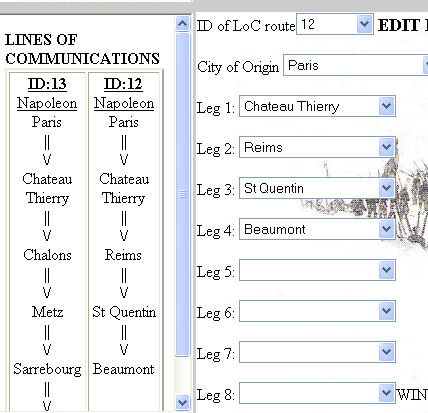 LoCs cost points to maintain at the rate of 2 points per node. As your army advances and retires your LoCs may require constant maintenance and adjustment
but do keep in mind that too much tampering may confuse couriers or reinforcements that might currently be using those LoCs to get around. So really, much
as the historical commanders did, you will be rewarded by planning your lines of communication in conjunctions with your plans of campaign and sticking to them as much as possible.
Units that do follow LoCs aren't linked to any physical LoC. So if you destroy one and build another approximate to it, you'll be fine. Each turn they start afresh looking for their destinations.
What would confuse a reinforcement though is if the city they were ordered to move to was no longer on a LoC.
LoCs cost points to maintain at the rate of 2 points per node. As your army advances and retires your LoCs may require constant maintenance and adjustment
but do keep in mind that too much tampering may confuse couriers or reinforcements that might currently be using those LoCs to get around. So really, much
as the historical commanders did, you will be rewarded by planning your lines of communication in conjunctions with your plans of campaign and sticking to them as much as possible.
Units that do follow LoCs aren't linked to any physical LoC. So if you destroy one and build another approximate to it, you'll be fine. Each turn they start afresh looking for their destinations.
What would confuse a reinforcement though is if the city they were ordered to move to was no longer on a LoC.
You can use LoCs built by other players and I envision a busy campaign having the leaders of the Nations perhaps bearing the brunt of the costs
for LoCs and keeping the national LoCs administered and garrisoned.
Every Corps should have one city on the LoC designated as its Center of Communications. This is the city that the Corps would retreat on and pass message traffic through if required.
In order to assign a city as a CoC that city must be on a functioning line of communication and in order to make a line, it must have at least 2 nodes.
Also of note, toward Center of Communications is the default path of retreat for armies.
Depots must be built on Lines of Communication in either Cities or fortresses in your home nation. The main role of a depot is
to be the source for all reinforcements. This is where new recruits are outfitted, trained, and sent on the road to the front. Also, any new units formed are formed at your depot.
In the event that you feel the need to make a new depot you must be aware that there is a delay of 7 game days before it becomes operational.
The requirement of the depot to be in your home nation means that as your armies are victorious you will lengthen the distance (amd so time)
between the available depots and your army. Reinforcements will become much more scarce.
Unlike Unit names, Corps names need not be unique across the game. They SHOULD be unique across your nation though and you can see the list of already
existing Corps on the screen. The historical norm was to number Corps with Roman numerals but they could also be named for tasks or leaders. The abbreviation is for 'Napoleon's Battles' labelling purposes so if it can be done in less than 4 characters it is better.
You will need to select a leader for your Corps from the list provided. Each of these leaders has a currently hidden rating for aggression and administration.
Aggression comes in to play in modifying their chance to march to the sound of the guns. Administration tracks the likelihood of them sending in unsolicited reports.
Each leader has a value based on these and the values are based on historical performance.
When a Corps is created, its headquarters unit is automatically created in the depot prefixed with your national abbreviation and ending with the name HQ.
The standard unit is a division which represents 2-6 brigades of men and every brigade could have 4-12 battalions/squadrons of 400-1000 men. That is to say that a division, as a concept, covers
a very wide span of what they could represent historically. For the purposes of this game system though all divisions are roughly equal in size and strength
except as modified by their type, rating, and condition.
TYPE: There are five types of units.
Infantry Division: This is the standard Napoleonic era division and it is the most robust. It does not have significant attached cavalry.
Cavalry Division: A cavalry division would be regarded as light cavalry unless it was in an all cavalry corps where it may be heavy cavalry.
Mixed Division: These are the Advance Guards and other combined arms divisions that were formed for special tasks. They have their uses but, like any hybrid, are not
categorically better than either of the purer types.
Garrison:Still not fully implemented, garrisons are deteached from infantry divisions in towns and then cannot move. They are very weak but ensure that
your forces maintain control and, perhaps more importantly, will send reports when attacked. Something that an empty town does not do.
HQ Division: The mechanics of the game require that various HQ elements be represented as division size though they obviously are not. in auto-generated combat (and piquet reports) they are not even counted.
In fact, they generally don't take losses and cannot be destroyed. We'll see if exploiting this forces a revision. They do still suffer from fatigue if force marched and DO count toward road load in movement.
In Napoleon's Battles terms, the Corps HQ are the only things with artillery.
RATING:Ratings represent the general training of the units.
Elite:Guard units. They are well overpriced but are better than regualrs.
Veteran:In most cases, veteran divisions aren't reflected well on the battlefield so may not be worth the expense.
They may be worthwhile for the French in 1813 though, for example.
Regular:Meat and potatoes. The main advantage that regular troops have is that they are the best troops that can be replenished through reinforcements.
Conscript:Generally poor raw recruits. These may be a bargain in that, like veterans, they likely aren't reflected accurately on the miniature battlefield. They do suffer though for fatigue and take nasty losses in automated battles.
Guerilla:More than just spaniards, these represent irregulars for any nation such as the Austrian Insurrection Infantry or the Russian cossacks. Also most of the Turkish army.
CONDITION:Condition represents the slow deterioration of effectiveness of units. For regulars (and below) it can be remedied with reinforcements.
Fresh:Standard starting condition.
weakened:Only slightly worse than Fresh. Units easily become weakened.
worn:A worn unit is an effective unit and this may be the norm for what you can allow a unit to fight at before it gets pulled off the line.
battered:Units in this condition are looking worse for wear but are still combat capable. Be careful with them though.
broken:Broken Units are nearly useless. They are not likely to be destroyed but they do almost nothing in battle.All they do is clog the roads.
destroyed:It is hard to destroy divisions. Even attempting to get them wiped out will likely just result in them retreating before they are destroyed.
Even at the end of the retreat from Moscow the different divisions of Napoleon's army were still distinct and organized... though broken.
Players may create units at any time and they appear instantly in their depot. They may do so, that is, so long as they have the points to spare.
Each unit must belong to a Corps and your Wing counts as a Corps. The fields are self explanatory (I trust)
but it should be noted that the abbreviation field is for miniatures. It goes onto their labels so if you can do it in less than 4 characters the better.
For naming the divisions there are two common historical conventions: They were either named for their commander
or they were given a number. Some nations (Prussians and Austrians at least) would sometimes call their divisions brigades. So a typical name for an Austrian Division might be Hertsfeld Bde or for a French Division it might be 23rd Division.
There are no restrictions on what you can call your divisions except that they must be unique across the whole game. So if someonce calls their Division 1st Division,
everyone else will need to be more creative. Understand that division commanders for 'Napoleon's Battles' are randomly generated and unnamed
so even if you call a division 'Morand Division' the labels and OOB for a battle with that division will not provide Morand's statistics.
Avoid using apostrophies or quotes in the names. Though it may accept it the game will hiccough at times from it.
Finally, remember that Garrison units cannot move so the only reason to build a Garrison unit is to protect that particular depot.
On this screen you may need to fiddle with it a bit. Select the Corps that you wish to transfer from and the Corps they will transfer to
and hit the submit button then the available divisions will appear. Transfer the divisions one at a time.
Transferring does not in any way order the unit to move to that new headquarters. All it does is change which corps would issue them orders
and who they would retreat toward if it came down to that.
Divisions can also be transferred to allied players, not only those from your same nation. Though the receiver will get an email telling them that they are gaining a division, you should tell them, through the form (and it will appear in the email), where that unit is believed to be and what its current orders are.
Replacements can be created at your depot. Select a city on an active line of Communications that the depot shares and the units will automatically
march toward that city every turn no matter how far. They will follow the Line of Communication. If any of your divisions is not moving
and shares a town with a replacement that can absorb the replacement and regain a level of condition.
If a replacement finds itself in a town with an enemy unit it becomes a straggler and then will daily retreat toward its depot. IF an enemy unit
comes across a straggler, it destroys it. Enemy units parked between your army and your depot effectively means therefore that you'll get no replacements.
Invisibly, couriers are riding all across the map at all times, trying to deliver messages as required. All orders, messages, and reports are transmitted by courier.
Couriers have a range of 3 road legs and cannot move through enemy occupied cities nor through enemy controlled territory
Unlike divisions, couriers do not check their intermediate destinations first. If they can reach their final destination they will do so.
If they cannot then they will look to go to their destination's Line of Communications point or Corps HQ location. For couriers, the intermediate route is designed to allow messengers to travel up to 6 road legs
'directly'. Once a message, order, or report is received the unfortunate courier is destroyed.
There is no mechanic for capturing or killing couriers if the city they are in is captured. The courier may get confused though which really has the same result.
In order to change the control of cities that do not have your troops in them, you can occupy the capital of a state with
a garrison.
The whole of chapter 6 is dedicated to expanding on Orders. Currently, the 'date effective' is not
enabled but will hopefully soon allow you to delay when an order is to take effect. For priority, 1 is highest priority and 3 is lowest.
The Intermediate destination can be very important for moving. Remember that 3 cities distance is the furthest a unit can see to detect a path to it.
You can give orders to any of your divisions regardless of their corps or location so long as the couriers can find them.
The 'courier through' field allows you to give up to a 3 city boost to its ability to find the unit.
The order to Leave Garrison is not fully enabled yet though it will dutifully drop of a garrison at the city if it gets there.
You would need to specify that the unit needs to move to the destination. The Garrison order is not a movement order.
Be wary of the 'avoid combat' choice because if it is selected, the unit will happily retreat all the way to Moscow (possibly taking losses as it does so)
without putting up a fight.
These are much like Corps orders but what happens here is that the order is sent to the Corps HQ and then they send out couriers to all their sub-units
and pass on the orders. Up to two specific units can be exempted from the order. Pay attention to the 'speed of HQ" because if it is too high, the HQ will be charging along into combat ahead of the Corps.
The default is 1.
The option to send messages is included for those players seeking to further embrace the nature of the game.
Sure you can pick up the phone or email the other players in the game but by including message you also have
the option to refrain from that and try restricting yourself to in-game communications.
The messages just go from one player to another via courier so there is a time delay. If the recipient
is quite a ways away, check the lines of communication to ensure that your courier will be able to find him.
Units send reports direct to their wing commander(the player) as opposed to putting it through their Corps HQ. You get reports for verious circumstances including
when your forces encounter enemy, when a battle is fought by the computer and results are found, when piquets encounter enemy or other piquets and
on a fairly random basis from Corps commanders. They'll send these approximately once every 5 days modified by their administration ability and your luck.
The reports they send will describe conditions of their troops in their location and adjacent. If a unit from their corps is more than one city away, its status will not be listed in the reports.
These reports will not deleted until you choose to do so.
The reports can be sorted by date written (descending), date received (descending) or originator name (ascending).
Spies may be hired for the low low cost of 3 points. This simulates finding an agent, sending them deep into enemy territory, and then having them come rising back to you to say what they
saw while they were there. You can send a spy to any city (including friendly) and ask them to watch for a certain nationality of troops.
This prevents them from panicking when the French spy sees French troops and also allows you to set a watch on the Russians marching from the east. When the spy sees Austrians in Vienna it isn't news but when 6 Russian divisions appear there it becomes news.
You also set a range on how many divisions you care to know about. Do you care if one division is running around there or do you only wish to be informed when it is larger than a corps?
A spy will take 3-5 days to reach the destination (no matter the real distance) and will take 3-5 days to return with his news.
As such spies are not terribly useful for in-theater operations but they will tell you which theater the enemy are operating in. An Austrian spy in Strasbourg and another in
Petit St Bernard will allow the Austrians to know if the French are coming via Italy or the Rhine. Of course, they are bamboozled if some rogue
general marches an army over Great St Bernard. A spy remains in place until its condition is met so you may well end up paying for it for the entire campaign season to no avail.
Place your spies prudently.
Roads are of two varieties: Major road and minor road. These are red  and brown
 on the maps respectively. A maximum of 10 divisions can move down a major road in a day and 6 can use a minor.
The road doesn't care which army used it. It is full after it is capped and not available to anyone (other than couriers).
Roads that cross rivers
on the maps respectively. A maximum of 10 divisions can move down a major road in a day and 6 can use a minor.
The road doesn't care which army used it. It is full after it is capped and not available to anyone (other than couriers).
Roads that cross rivers
 (regardless of river size) are considered bridged and they have their capacity halved. One day there may be bridge destruction and repair mechanics but not yet.
The scale of the maps takes such things as mountain roads and well made roads into account by playing with real-world distances. It would require more days therefore to cross the Swiss Alps than if you went around them perhaps.
Divisions cannot stop on roads. They only exist in cities. Battles that are taken to miniature or SVG simulator should not always assumed to be city fights though.
In the abstract they are occuring in the vicinity of the cities and towns.
Units move in order of priority (and if they have the same priority, in order of which unit was made first, of course).
All units generally have a movement rate of 1 but HQ units can move as fast as 3 if desired.
They can be forced to march faster if required. The priority of movement for a unit is as follows:
-First they will try to reach their intermediate destination
(regardless of river size) are considered bridged and they have their capacity halved. One day there may be bridge destruction and repair mechanics but not yet.
The scale of the maps takes such things as mountain roads and well made roads into account by playing with real-world distances. It would require more days therefore to cross the Swiss Alps than if you went around them perhaps.
Divisions cannot stop on roads. They only exist in cities. Battles that are taken to miniature or SVG simulator should not always assumed to be city fights though.
In the abstract they are occuring in the vicinity of the cities and towns.
Units move in order of priority (and if they have the same priority, in order of which unit was made first, of course).
All units generally have a movement rate of 1 but HQ units can move as fast as 3 if desired.
They can be forced to march faster if required. The priority of movement for a unit is as follows:
-First they will try to reach their intermediate destination
If they cannot reach it in a single march they will look for a path that will get them there in two marches and take one.
If they cannot do that they look for a route that will get them to the intermediate within 3 marches and take a road that will get them closer.
Units can only find targets that are within 3 moves of their current location
-If they cannot find their intermediate they will look to see if their Corps HQ is within 3 of their intermediate.
If it is then they will move toward their Corps HQ if they can.
-If that is no good they will look to see if their Corps' Line of Communication is within 3 and they will move toward that if they can.
-As long as they have an intermediate goal they will continue to try to reach that before even looking at their final destination. Once they reach the intermediate
goal though they will begin to focus on that final destination.
You can therefore order a unit to go to an intermediate destination that is 3 legs away and then on to the final destination that is 3 further legs away.
So a unit has an order range of 6. Of course this all assumes that there is no road congestion or enemy troops interfering with them. If a road has reached its daily capacity and a unit sees another way to reach its destination it will start moving toward it.
So don't assume that they are always politely waiting to take the shortest route. Your on-site commanders will make their own decisions.
It should be noted that if a unit is obliged to retreat from combat, the retreat path overwrites any intermediate destination they might have had.
Now, if you were really tricky (or bored) you could set it up so that a unit was 3 legs from its Corps' LoC which was 3 legs behind its Corps HQ and its intermediate destination was 3 legs further on and the final destination was 3 legs beyond that
and if the Corps HQ didn't move until it was passed and nothing flumoxed the unit, it could march for 12 days without further orders and arrive at its destination.
This represents an extreme though rather than something to be attempted.
Units will move in order of priority (lowest number first). The default priority is 1 for mixed divisions, 2 for infantry, 3 for cavalry, and 4 for headquarters. When ordering a division to move you may assign a new priority to the unit. the priority will revert to default when it reaches its destination.
Cavalry divisions and mixed divisions can be tasked with sending out patrols to scout adjacent cities.
They will spy out the land without engaging the enemy significantly and they generally won't be sighted as they do this.
If, on the other hand, their enemy is also scouting out the same road then the piquets will encounter one another and bounce.
Cavalry piquets will send reports of contacts that they see to their wing commanders. Their reports are generally accurate plus/minus 25%.
Due to the amount of resources required to support long range reconnaissance, these units can only watch one road effectively at a time and
they will do so when ordered.
If you select 'piquet advance' on the Corps Orders screen then the Corps commander will order all cavalry and mixed units under his command to send piquets out
in random directions (not to friendly controlled towns) when the units are stopped.
Units may be ordered to force march and once so ordered will continue to put in that effort until specifically
ordered to no longer force march. A force marching unit can move twice as far as a unit moving normally but it may aquire
fatigue as it does so. Fatigued units cannot force march (though they retain their order to force march and will try again once they are no longer fatigued).
Cavalry, elite, mixed, guerilla, and veteran units are all less likely to gain fatigue when forced marching. Conscripts, of course, are more likely to gain fatigue.
Fatigue has adverse affects on some combat resolution methods (not miniatures). HQ units that force march could potentially move up to 4 road lengths.
If a unit spends a day not moving (regardless of whether it wanted to move or not), it has a chance of losing any fatigue it has.
The chance is less for conscripts and guerillas than it may be for others. Also, if a unit is spending the day not moving and there are reinforcements in the same town
that match their rating,nationality and type they can regain strength and the replacement (even straggler) will be removed.
Depending on the weather it was common in the Napoleonic era to hear cannon fire long before any courier would arrive to report that there had been an encounter. Therefore some commanders would institute the policy of
marching to the sound of the guns. If a general heard cannonfire he would change plans and order his troops to make all haste to the battlefield with knowledge of what they were marching toward.
When issuing orders, you can order commanders to adopt this policy.
Some commanders might have conveniently fickle hearing though. Therefore if a unit is not in a combat themselves and there is a battle in an adjacent city, they can try marching to the sound of the guns and may arrive as reinforcements.
If their Corps commander is not present to influence their decision making, the game looks to their default national characteristics. Consider your orders to 'march to the sound of the guns' to
be more of an encouragement than anything guaranteed. Marching to the Sound of Guns does take roadload into consideration.
Units marching to the sound of the guns may suffer fatigue since this is effectively a forced march as they hurry to the battlefield.
If the unit does get sidetracked and so marches, they will lose any intemrediate destinations they may have been ordered to go to but will retian their original final destination (if any).
You can order a unit to drop off a garrison at a town, city, or fortress when it is there. Only Fresh,weakened or worn infantry units can do this.
Doing so weakens their condition by a step. The garrison, once created, comes under the Wing Commander's command (as opposed to any corps).
Garrisons can never move and if forced to retreat are eliminated. They DO cost points to maintain. Garrison units are enhanced in combat strength when defending a fortress.
If you place a garrison in the capital of an enemy state, control of that state changes to that of your alliance. This makes it much easier for couriers to function.
When and divisions share a city there is combat that can only end with one side retreating. There is first a check on the local commanders (assuming the player is not located there)
where based on the odds and their aggression level they may decide to retreat.
If neither side retreats then there will be a battle in one form or another. Hopefully there will be email notifying the player (or proxy) of the upcoming fight
but currently they must needs daily check their Battle Method Selector to see what has queued up overnight. Recognize that you are choosing the resolution method for a battle that is, in effect, already under way.
It will be resolved (one way or another) by the next turn resolution.
The Battle Method Selector lists all the battles that you are responsible for on a given day and the forces that are there at start.
It is assumed that some battles will not be worth fighting by miniatures (or SVG) so hopefully enough information is provided to allow you to choose how you wish to deal with it.
If both parties have not selected a method of resolution for a given battle it will automatically be resolved by the computer.
If you (and your opponent) elect to fight a battle by miniatures or SVG, the Campaign will halt awhile so that you have time to play the game out.
For Miniatures it is until the next Sunday night. If you have not resolved it by then it resolved by computer and the game carries on.
When the game presents the size of battle, it does not include any troops that are marching to the fight (either on orders or by marching to the sound of the guns).
There is no guarantee that what looks like a fair (and fun) game at this point will be the same when the battle goes to be fought.
The game directly supports 'Napoleon's Battles' miniatures but there is no reason why the information provided by the game couldn't just as well be used by other
rulesets. For example, maybe some players look for the small 2 division vs 2 division fights and play those out using 'Shako'.
When both players have selected to resolve a battle using miniatures the game is paused to allow them to complete the game over the weekend.
The day following the selection of the battle (the system needs to confirm the assent) Orders of Battle and labels will be available for each side
through the Engagements interface.
There are two reinforcement phases which the players can determine how to use for themselves in the game. The basic rule of thumb
is the fatigued divisions arrive in reinforcement phase 2 and non-fatigued ones arrive in reinforcement phase 1. In
the OoB it will list Corps artillery as arriving in reinforcement phases and it should be assumed that Corps commanders arrive with them.
The OoB is randomly generated but modified for nationality and condition so if a division is broken you should expect it to show up with perhaps 2 16 figure brigades.
Corps and Wing commanders use their NB stats but divisional commander stats are random. certainly by mutual consent players could swap in their personal favourite NB stats
if they so choose.
All brigades in a fatigued division (listed as such on the OoB) should be given 1D3 hits at the start of the game.
Following the miniature battle, players should sit down and come to mutual agreement on the state of all of their divisions following the battle.
'destroyed' should rarely if ever be the choice. Once that is done (and the tables and chairs have been put away) the players should individually log in and
input the results of the fight through the Combat Results form. On that form, disregard the error message that appears at first above the message box. It'll clear up
when the battle is selected. If you are a proxy you have the option to write a message to the owner of the army, describing the results of the battle.
Couriers will ensure that the appropriate time delay is adhered to.
For casualties among commanders, they should be noted and replacement commanders can be assigned. The Generic replacement ones are free but the others cost points.
There is nothing to factor in long term wounds so keep in mind that if you mark a commander as dead they are really most sincerely dead.
Note that there is also a column for retreats. Your available options are to any adjacent city that is not enemy controlled so you could 'retreat' to another fight a la Quatre Bras intentions.
All entries into the system of battlefield results and retreats are honour based. I'm sure, for example, that there will be times when
a listed available retreat path has a side advancing through the enemy but that is not the intended use for this.
Retreats are for backward movement. If you wish to pursue or move on following a fight actual orders will need to be sent.
Unless both parties input their battle results in before 23:45 Sunday evening, the system will think that the battle has not been fought and will run it as computer generated.
Still under development but with interesting prospects. Some browsers have trouble
seeing it. Mozilla works fine (and its free).